4 Plugins to turbocharge your Firebug
Anyone developing for the web will have at least used or heard of Firebug. It is very powerful tool for debugging and testing any web pages on Firefox. You can live edit, debug, and monitor CSS, HTML, and JavaScript.
Although Firebug is already packed with features, there are always rooms for extras. Since the creation of Firebug, plugins are being developed to extend the power of Firebug even further. Here is a list of useful plugins for Firebug.
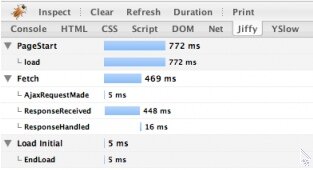
Jiffy
Jiffy provides a very detail and visual view of the Javascript time measurements captured by . It allows you to get information of AJAX requests and other Javascript functions.
YSlow developed by Yahoo! is probably one of most famous Firebug extension out there. It analyzes web page performance and tells you why performance is slow. It gives you information on all the requests, load time, sizes and even give you tips to improve your site speed.
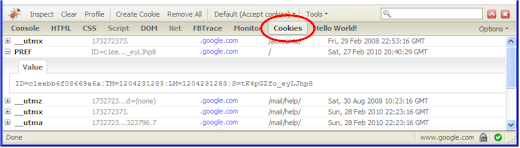
FireCookie
Instead of using other Firefox extensions to view cookies. This Firebug plugin allows developers like you to keep using the firebug interface to debug with cookies. FireCookie gives you the ability to view and manage cookies. It also has a console where you can see when cookies are created, changed or deleted.
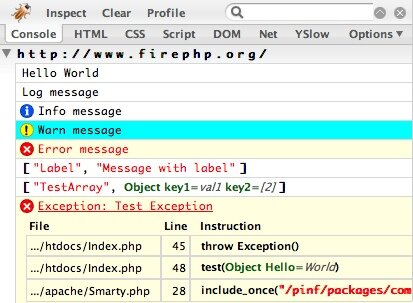
FirePHP
For those PHP developers out there, FirePHP is enable you to print to the Firebug Console using simple PHP function call. The main benifit is that all the debugging data are hidden from normal user and you can review in a nicely format within Firebug console.
Updates:
So still want more plugins? You can always build your own. Jan Odvarko of Software is hard has a series of tutorial on creating a Firebug plugin.
Comments so far
Post a comment
Trackbacks/Pingbacks