84 Bytes
Development, Design, Applications, and the Web.
Development, Design, Applications, and the Web.
Posted by Richard Wong under Development, Javascript | 0 Comment
I was involved in a project recently with some heavy use of Javascript. We needed to load many javascript files on the page. Because of the site structure and the legacy system, there are potential situations where the same javascript is loaded more than once. To over come that, we needed something that can handle the script loading for us.
After looking at many options, we decided to write our own quick and dirty lazy script loader which will fit our need.
The key features we want from it are:
Posted by Richard Wong under Development, Tools, Web Apps | 2 Comments
After about 4 months without posting anything, I really want to get myself going again by starting with a small post about the latest projects from Mozilla Labs.
As for most us who develop for the web, Mozilla Firefox are already our default browser as its add-on structure gave us many essential tools in development. So it’s very exciting to see their lab coming out with experimental project that focus on developers.
Bespin was launched last week as an open extensible web-based code editors aiming to increase developer productivity, enable compelling user experiences, and promote the use of open standards.
Without me repeating too much, here is an introduction video from Mozilla:
from on .
Posted by Richard Wong under Database, Development | 5 Comments
Almost all of the modern web applications involve the use of relational database. So the performance of your applications are very much affected by the quality of the SQL queries you run. Here are some simple performance tips from MYSQL forge that you should consider when writing queries.
- Use EXPLAIN to profile the query execution plan
- Use Slow Query Log (always have it on!)
- Don’t use DISTINCT when you have or could use GROUP BY
- Insert performance
- Batch INSERT and REPLACE
- Use LOAD DATA instead of INSERT
- LIMIT m,n may not be as fast as it sounds
- Don’t use ORDER BY RAND() if you have > ~2K records
- Use SQL_NO_CACHE when you are SELECTing frequently updated data or large sets of data
- Avoid wildcards at the start of LIKE queries
- Avoid correlated subqueries and in select and where clause (try to avoid in)
- ORDER BY and LIMIT work best with equalities and covered indexes
- Separate text/blobs from metadata, don’t put text/blobs in results if you don’t need them
- Delete small amounts at a time if you can
- Make similar queries consistent so cache is used
- Don’t use deprecated features
- Turning OR on multiple index fields (<5.0) into UNION may speed things up (with LIMIT), after 5.0 the index_merge should pick stuff up.
- Use INSERT … ON DUPLICATE KEY update (INSERT IGNORE) to avoid having to SELECT
Now if you know all the above tips, then may be you want to start looking at database scaling, design and more from MYSQL forge.
Here are some more detailed articles about optimizing MySQL for those of you want to get your hands dirty:
Posted by Richard Wong under Development, Tools, Web Apps | 3 Comments
 When you develop any sort of websites, you need to work out the flow / journey of your users. It is such an important part of any web product. If you got it wrong, you could be left with confused and unhappy user that would eventually lead to the lost of users.
Recently I found this little web tool called Product Planner that allow you to easily create user flows and share it with others.The idea is that by looking at examples of other successful web products, you can get a better idea of how to create your own.
Posted by Richard Wong under Development, Tools, Web Apps | 3 Comments
As a blogger / developer, it is always fascinating to know the loading time of your website and compare it with others. Of course, the loading time of your website depends on many different factors. It could be anything between the software and hardware that power your site. But users of your site does not really care about any of this. It is how long it takes for them to see your site on their browser that counts.
So here I prepared a list of free websites that can help you to test the loading time of any website.
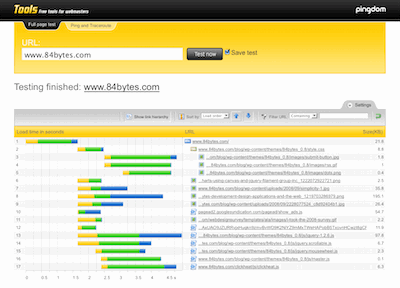
Probably the best tool from this list. It loads a complete HTML page including all objects (images, CSS, JavaScripts, RSS, Flash and frames/iframes). It looks very similar to the Firebug “Net” feature. The load time of all objects is shown visually with time bars.
84 Bytes is Richard Wong's website about web development. It's a place to share code, thoughts and ideas
Subscribe in your preferred reader