84 Bytes
Development, Design, Applications, and the Web.
Development, Design, Applications, and the Web.
Posted by Richard Wong under Development, Tools, Web Apps | 2 Comments
After about 4 months without posting anything, I really want to get myself going again by starting with a small post about the latest projects from Mozilla Labs.
As for most us who develop for the web, Mozilla Firefox are already our default browser as its add-on structure gave us many essential tools in development. So it’s very exciting to see their lab coming out with experimental project that focus on developers.
Bespin was launched last week as an open extensible web-based code editors aiming to increase developer productivity, enable compelling user experiences, and promote the use of open standards.
Without me repeating too much, here is an introduction video from Mozilla:
from on .
Posted by Richard Wong under Development, Tools, Web Apps | 3 Comments
 When you develop any sort of websites, you need to work out the flow / journey of your users. It is such an important part of any web product. If you got it wrong, you could be left with confused and unhappy user that would eventually lead to the lost of users.
Recently I found this little web tool called Product Planner that allow you to easily create user flows and share it with others.The idea is that by looking at examples of other successful web products, you can get a better idea of how to create your own.
Posted by Richard Wong under Development, Tools, Web Apps | 3 Comments
As a blogger / developer, it is always fascinating to know the loading time of your website and compare it with others. Of course, the loading time of your website depends on many different factors. It could be anything between the software and hardware that power your site. But users of your site does not really care about any of this. It is how long it takes for them to see your site on their browser that counts.
So here I prepared a list of free websites that can help you to test the loading time of any website.
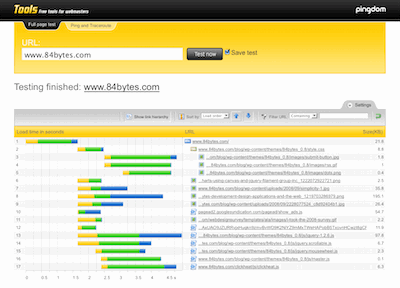
Probably the best tool from this list. It loads a complete HTML page including all objects (images, CSS, JavaScripts, RSS, Flash and frames/iframes). It looks very similar to the Firebug “Net” feature. The load time of all objects is shown visually with time bars.
Posted by Richard Wong under Tools, Web Apps | 27 Comments
If you are a busy web developer that also need to work on the interface, here is a handy list of online tools to help you save time and effort creating nice graphics for your sites or apps.
Posted by Richard Wong under Tools, Web Apps | 3 Comments
Feedly is “a more social and magazine-like start page for Firefox”. It is a very well made and design application that really take the concept of homepage and RSS aggregation to the next level. They have social features like sharing, annotation and even twitter integration for each post.
But what interest me the most is the ability to do real-time summary of the most relevant content available on the web based on your interests, your reading patterns, and recommendations from your friends. In other words, you can see straightaway the hottest, latest post from your feeds.
After using it for a couple of weeks, I really enjoyed its clean design and functionality. I found myself using it more to do feed reading than Google Reader. The way Feedly organizes the post are far more natural to scan read a large amount of headlines and lead me to discover more interesting posts than before.
The coolest part of Feedly is that it doesn’t replace your beloved Google Reader. It actually integrate very well with it. All your read or star items are always synced that means you can use both to suite your needs.
So go ahead and give it a go at http://www.feedly.com/

84 Bytes is Richard Wong's website about web development. It's a place to share code, thoughts and ideas
Subscribe in your preferred reader