84 Bytes
Development, Design, Applications, and the Web.
Development, Design, Applications, and the Web.
Posted by Richard Wong under Development, Tools, Web Apps | 2 Comments
After about 4 months without posting anything, I really want to get myself going again by starting with a small post about the latest projects from Mozilla Labs.
As for most us who develop for the web, Mozilla Firefox are already our default browser as its add-on structure gave us many essential tools in development. So it’s very exciting to see their lab coming out with experimental project that focus on developers.
Bespin was launched last week as an open extensible web-based code editors aiming to increase developer productivity, enable compelling user experiences, and promote the use of open standards.
Without me repeating too much, here is an introduction video from Mozilla:
from on .
Posted by Richard Wong under Javascript, Tools | 3 Comments
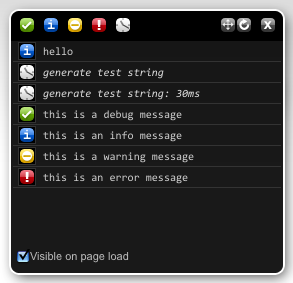
Everyone who programmed in Javascript will know that one of the most common way to debug across browsers is the alert() function. Although, you can use tools like Firebug and their console api to output. It doesn’t work on IE or Safari. So a pure Javascript based solution would be great.
Blackbird is one of the latest script that does just that. It offers:
a dead-simple way to log messages in JavaScript and an attractive console to view and filter them. You might never use
alert()again.
All you need to do is include the Blackbird script and style. Then you can start logging messages using their APIs including different message types and profiling as shown below:
log.debug( message )- Add a debug message to Blackbird
message: the string content of the debug messagelog.info( message )- Add an info message to Blackbird
message: the string content of the info messagelog.warn( message )- Add a warning message to Blackbird
message: the string content of the warn messagelog.error( message )- Add an error message to Blackbird
message: the string content of the warn messagelog.profile( label )- Start/end a time profiler for Blackbird. If a profiler named
stringdoes not exist, create a new profiler. Otherwise, stop the profilerstringand display the time elapsed (in ms).
Posted by Richard Wong under Development, Tools, Web Apps | 3 Comments
 When you develop any sort of websites, you need to work out the flow / journey of your users. It is such an important part of any web product. If you got it wrong, you could be left with confused and unhappy user that would eventually lead to the lost of users.
Recently I found this little web tool called Product Planner that allow you to easily create user flows and share it with others.The idea is that by looking at examples of other successful web products, you can get a better idea of how to create your own.
Posted by Richard Wong under Development, Tools, Web Apps | 3 Comments
As a blogger / developer, it is always fascinating to know the loading time of your website and compare it with others. Of course, the loading time of your website depends on many different factors. It could be anything between the software and hardware that power your site. But users of your site does not really care about any of this. It is how long it takes for them to see your site on their browser that counts.
So here I prepared a list of free websites that can help you to test the loading time of any website.
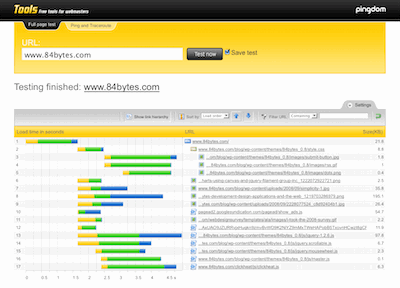
Probably the best tool from this list. It loads a complete HTML page including all objects (images, CSS, JavaScripts, RSS, Flash and frames/iframes). It looks very similar to the Firebug “Net” feature. The load time of all objects is shown visually with time bars.
Posted by Richard Wong under Tools, Web Apps | 26 Comments
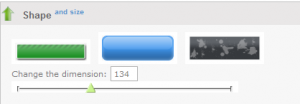
If you are a busy web developer that also need to work on the interface, here is a handy list of online tools to help you save time and effort creating nice graphics for your sites or apps.
84 Bytes is Richard Wong's website about web development. It's a place to share code, thoughts and ideas
Subscribe in your preferred reader