84 Bytes
Development, Design, Applications, and the Web.
Development, Design, Applications, and the Web.
Posted by Richard Wong under Javascript | 0 Comment

When it comes to cross browsers vector graphics, there have always been debate about whether to use SVG/VML or Canvas/VML. Even if you made the decision, you still need to know how to implement them.
Now Raphaël is aiming to simplify development with vector graphics across browsers. It provides us with a simple adapter to work with vector graphics using SVG/VML.
Below is an example of the basic:
// Creates canvas 320 × 200 at 10, 50
var paper = Raphael(10, 50, 320, 200);

// Creates circle at x = 50, y = 40, with radius 10
var circle = paper.circle(50, 40, 10);

// Sets the fill attribute of the circle to red (#f00)
circle.attr("fill", "#f00");

// Sets the stroke attribute of the circle to white (#fff)
circle.attr("stroke", "#fff");
If you want to create your own specific chart or image crop-n-rotate widget, you can simply achieve it with this library.
Posted by Richard Wong under Tutorial | 9 Comments
When it comes to pop-up windows, people don’t really associate them to being accessible and they are some what annoying. But sometimes it is necessary for whatever reason.
If you think about it, a link that opens up a new window is one of the most simple thing you can do with javascript & HTML. There is no reason for it to be ugly.
This is the old fashion and totally wrong way of doing it:
<a href="javascript:window.open(http://www.popup.com/);">Popup link</a>
Why? The a tag is not linking to a link but instead it is running some javscript. That means the whole meaning of the link is gone.
Here is what an accessible and clean link looks like:
<a href="http://www.popup.com" rel="pop-up">Open a Popup</a>
In this version, there is no inline javascript which is always a good pratice to separate HTML and javascript. It keeps everything simple and clean. The addition of the rel attribute is used to describe the relationship between the current page and the href destination of the anchor.
Now we have this beautiful HTML link. It is time to do some magic with javascript and jQuery.
( function popup() {
        $( document ).ready( function() {
                $("a[rel='pop-up']").click(function () {
                    var features = "height=700,width=800,scrollTo,resizable=1,scrollbars=1,location=0";
                    newwindow=window.open(this.href, 'Popup', features);
                    return false;
                });
        } );
}() );
This is a very simple javascript using jQuery. Basically, the code is looking for all the links with the rel attribute and assign a onclick event to open the pop-up window. Of course, there are different ways to abstract the above code to make it more flexible. But the idea is to have beautiful pop-up link and have the javascript to do the work later.
Posted by Richard Wong under Tools, Web Apps | 3 Comments
Feedly is “a more social and magazine-like start page for Firefox”. It is a very well made and design application that really take the concept of homepage and RSS aggregation to the next level. They have social features like sharing, annotation and even twitter integration for each post.
But what interest me the most is the ability to do real-time summary of the most relevant content available on the web based on your interests, your reading patterns, and recommendations from your friends. In other words, you can see straightaway the hottest, latest post from your feeds.
After using it for a couple of weeks, I really enjoyed its clean design and functionality. I found myself using it more to do feed reading than Google Reader. The way Feedly organizes the post are far more natural to scan read a large amount of headlines and lead me to discover more interesting posts than before.
The coolest part of Feedly is that it doesn’t replace your beloved Google Reader. It actually integrate very well with it. All your read or star items are always synced that means you can use both to suite your needs.
So go ahead and give it a go at http://www.feedly.com/

Posted by Richard Wong under Javascript, Tools | 2 Comments

I have recently came across this interesting and useful Javascript tool called JSLint. You feed in your javascript code and JSLint will scan through and looks for problems in your code.
You might ask what is the different between this and debugging using Firebug? Well, although it is only a syntax checker and validator, it is much more stricter and follows proper Code Conventions. In other word, it will tell you errors you normally won’t get.
As you know, Javascript sometimes allows code to be implemented in a sloppy way which could be very troublesome for large complex projects. So I have been using this tool as a reference point to tighten up my javascript code.
So go and paste your code at JSLint and see how your code is doing. But I must warning you, it might hurt your feeling!
Source: JSLint
Posted by Richard Wong under Development, Javascript, Tools | 2 Comments
Anyone developing for the web will have at least used or heard of Firebug. It is very powerful tool for debugging and testing any web pages on Firefox. You can live edit, debug, and monitor CSS, HTML, and JavaScript.
Although Firebug is already packed with features, there are always rooms for extras. Since the creation of Firebug, plugins are being developed to extend the power of Firebug even further. Here is a list of useful plugins for Firebug.
Jiffy provides a very detail and visual view of the Javascript time measurements captured by . It allows you to get information of AJAX requests and other Javascript functions.
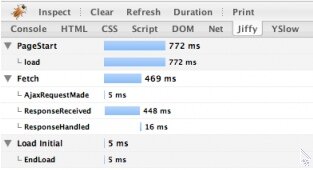
YSlow developed by Yahoo! is probably one of most famous Firebug extension out there. It analyzes web page performance and tells you why performance is slow. It gives you information on all the requests, load time, sizes and even give you tips to improve your site speed.
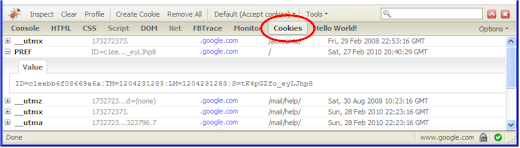
Instead of using other Firefox extensions to view cookies. This Firebug plugin allows developers like you to keep using the firebug interface to debug with cookies. FireCookie gives you the ability to view and manage cookies. It also has a console where you can see when cookies are created, changed or deleted.
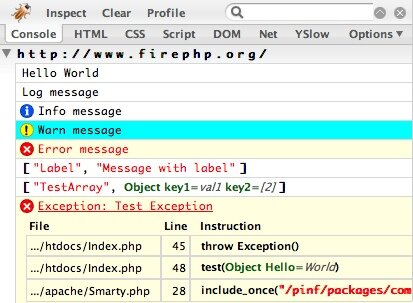
For those PHP developers out there, FirePHP is enable you to print to the Firebug Console using simple PHP function call. The main benifit is that all the debugging data are hidden from normal user and you can review in a nicely format within Firebug console.
Updates:
So still want more plugins? You can always build your own. Jan Odvarko of Software is hard has a series of tutorial on creating a Firebug plugin.
84 Bytes is Richard Wong's website about web development. It's a place to share code, thoughts and ideas
Subscribe in your preferred reader